Home Of Technology
  • Home
  • About
  • Contact
  • DMCA/PRIVACY
  • Home
  • Mobile
    • Android
    • iOS
    • BLACKBERRY
    • NOKIA
    • WINDOWS PHONE
  • PC tutorials/apps
  • Browsing Tips
  • ONLINE BANKING
  • TECH NEWS
Showing posts with label BROWSING TIPS. Show all posts

Friday, 4 August 2017

How to Perform Reverse Image Search on Google & Facebook Using Your Mobile Phone

 Unknown     05:46:00     BROWSING TIPS, TECHNOLOGY NEWS     No comments   


This tutorial might be useful to those who aren't aware of some capabilities of Google Search Engine.

Google Reverse Search lets you search by images instead of keywords. Upload a picture from your desktop, tablet or mobile phone, and Google will show all the other web pages on the Internet that have similar images.
Reverse Search is useful for verifying the source of photographs, WhatsApp images, screenshots and memes. Tinder and Facebook users have used "Search by Image" to research profile pictures of their potential dates while travelers use it for finding the photo's location.

You can do Reverse Image Search on mobile or PC depending on what is convenient for you without installing any applications.
How to do Reverse Image search?
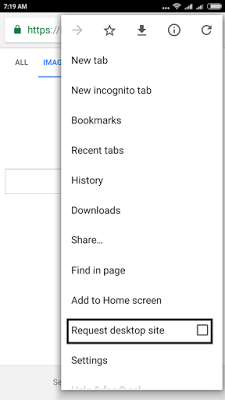
1 Go to images.google.com on PC and if you are using a Mobile Phone, open same url using Google chrome, request for desktop site as seen below
1.png
2 Wait for the page to finish loading, you should have something like this

2.png
3 Click on the camera icon


3.png

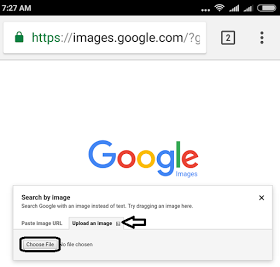
4 Click on the image upload tab and choose your desire image to upload from your directory.
4.png

Once the image is done uploading, it will bring you the best search result.

5.png

No need of any app.

You can also perform Reverse Image Search on Facebook. Just follow the easiest steps below;
  1. Right-click a Facebook image in your Web browser and select "Properties" from the drop-down menu.
  2. Locate the "Address: (URL)" section and write down the second to last number. It should look like: 5102898
  3. Replace "ProfileID" in the following URL with the number that you copied: http://www.facebook.com/profile.... This results in a URL of: https://facebook.com/profile.php?id=182073391
  4. Copy the URL that you created in Step 3 and paste it into your Web browser. Press "Enter" to access the user's Facebook profile.
  5. Warning; You may have to be logged in to your Facebook account to access a user's profile.
Read More
  • Share This:  
  •  Facebook
  •  Twitter
  •  Google+
  •  Stumble
  •  Digg

Friday, 14 April 2017

Etisalat and Glo 0.0KB Free Browsing With New Tweakware v6.0

 Unknown     04:17:00     BROWSING TIPS     No comments   

Hi folks, this is to inform you there is another variant of TweakwareVPN, known as Tweakware version 6.0, it accompanies new refreshed servers, which gives clients greater chance to use the VPN. 

The most recent Tweakware variant 6.0 has been refreshed with the new servers and it showed up at the opportune time as it will fill in as an other option to the Etisalat N0.0k that quit working.

For those that complained about Etisalat N0.0K tweak (60mb daily limit), with new Tweakware vpn you keep flexing with your free browsing, the Tweakware v6.0 likewise working fine with Glo boundless free browsing.

There are new '30 free servers' inside the Tweakware v6.0, which implies you can now settle on more decision of the free servers to utilize, however remember that you are just constrained to 350MB every day on the off chance that you are utilizing the free form else you have to upgrade to be a premium member to use premium servers and unlimited bandwidth. In any case, with this 30 free included server, you can surf the web for free without thinking about any impediment.

Remember that premium servers are free from annoying ads and they are more optimized. If you are happy with the Glo network in your area, I encourage you to upgrade your Tweakware to Premium version to appreciate the change minus all potential limitations.

Download the most recent version of Tweakware v6.0 from PlayStore here

On the other hand, you can download Tweakware v6.0 apk here

Components of Tweakware V6.0

Fixed inability to connect on Etisalat 0.0kb tweak

Fixed bug that makes the application stop at each 95 - 100 MB on HTTP Mode

Refreshed inherent server list

Up to 25+ Free Servers contain ads

More stable than previous versions because of more choices of free servers for users.

To Setup Etisalat N0.0k (60mb daily limit)

APN Settings

Utilize Etisalat default APN settings

Launch the Tweakware v6.0

In Server list, select any free server from the 30 servers in the drop-down (if you are not a premium user.)

On the Tweaks list, select "Etisalat 0.0kb".

Presently, Tick the box next to Tweaks, to enable it.

At that point tap on "connect" and it will connect in seconds.

To utilize it with Glo free browsing, take after Similar methods and when you get the opportunity to change list, select "Glo 0.0kb" and connect. 


Many individuals are additionally attempting to utilize free servers as you are attempting so most circumstances, you will get a blunder message or it won't connect. This is a result of activity and system stick on the free servers. So continue attempting until yours connect and keep flexing your free browsing.

As I said before, to enjoy the tweak to the fullest, you require a premium account. Moving up to premium costs just #500 and offers access to every one of the servers with no day by day limit.

Enjoy it while it last and keep in mind to share this post utilizing the share button beneath.
Read More
  • Share This:  
  •  Facebook
  •  Twitter
  •  Google+
  •  Stumble
  •  Digg

Thursday, 15 September 2016

Glo Latest Free Browsing Tweak 2016 Using UC Mini Handler

 Unknown     07:19:00     BROWSING TIPS     No comments   


This new free browsing method allows you to download large file and stream life videos but can't by use on other application sure as Facebook, Whatsapp, Twitter e.t.c but you can still enjoy this service using this social network on the browser.


HOW TO SETUP UC MINI HANDLER FOR GLO BROWSING TWEAK

To enjoy this latest free browsing trick simply start by downloading Uc Mini Handler Apk Android App from HERE
Launch the app and configure it as below
Proxy type: REAL HOST
Proxy server: redirect.glo.com
Real proxy type: default (you can also use
HTTP)
Real proxy port: 80
Then save and start browsing

One thing I notice is that at time you might have difficulties when downloading large files with this tweak. What you simply do is to visit this site with your Uc mini handler muchproxy.com. Then add the name of the site you want to download from, click go and your download will start

When you finish downloading the files, you will noticed that muchproxy normally rename the file .php format. Don't worry, just change the .php extension to he format of the file you are downloading. That is, when you are downloading an .mp4, .apk, .exe .pdf file, when the download option popup before downloading just change the .php to you appropriate file extension.
Read More
  • Share This:  
  •  Facebook
  •  Twitter
  •  Google+
  •  Stumble
  •  Digg

Monday, 23 November 2015

MTN UNLIMITED BROWSING WITH #0.0 RELOADED

 Unknown     11:56:00     BROWSING TIPS     No comments   


Lets get started :


First of all u need to know that this cheat is related to the music+ cheat.... so if u have never done the music+ cheat before go to your message. Then send music to 5900  OR  D to 5900 

Once you exhaust your 150mb, Send CANCEL7D to 5900 and send D to 5900 again, fresh 150mb will be given to you.

...dial *559*2# to check your balance..under music+

Then go to your simple android server. 
•••Injection query/url= http://musicplus.mtnonline.com 
•••Injection host= musicplus.mtnonline.com 
•••Proxy host =10.199.212.2
•••Proxy port=8080 
•••Connection Timeout=10
•••Injection type=Inject 
•••log level=debug 
•••Buffer size=8092

Then go to your normal phone settings go to more =go to mobile network =go to access point names =Mtn =create new apn with d following info 
•••Proxy = 127.0.0.1
•••Port= 8080 
•••Apn type= default 
•••Apn= web.gprs.mtnnigeria.net 

After that to power all your applications you need to get your *PROXY DROID or *AUTOPROXY.. #NOTE: these applications need root access. 
The settings for both is 

•••proxy=127.0.0.1
•••Port=8080
NOTE : if you have the latest Simple Android Server there is no need to use autoproxy 

Now to make it unlimited follow my step below 

CLICK HERE To Download SMS Schedule

Launch the application, Click on Schedule sms

Type 5900 in the Phone number field 

Type Cancel7D in the message box

Confirm your date and time 

Choose your sms sending interval (the time interval you think you can finish 150mb) I used 30mins in mine 

Save that. 

Go back to the application and create another entry 

Extend the time by a minute 


Type 5900 in the Phone number field 

Type D in the message box

Confirm the date and save the sending interval to the interval you saved the first one. 

Now to use psiphon with mtn music plus. 
Launch Psiphon Handler 

On the handler menu. 
Proxy type - real host

Proxy server - musicplus.mtnonline.com

Real Proxy server - 
Real Proxy type - inject 

Host address 10.199.212.2 
Port 8080 

Region : Japan

Save and Connect 

To use Simple Android Server (root) 

Goto Local Server settings 
Tick Use Global Proxy 

Click General Settings

Proxy host: 10.199.212.2 
Proxy port: 8080 

Injection Query/Url:
http:/musicplus.mtnonline.com

Injection host: musicplus.mtnonline.com

Injection line: press enter 4 times 

Save and Connect SimpleServer By Drawing the Switch 

Enjoy Browsing Unlimitedly Totally Free. 


SHARE YOUR COMENTS...
Read More
  • Share This:  
  •  Facebook
  •  Twitter
  •  Google+
  •  Stumble
  •  Digg

Wednesday, 11 November 2015

Etisalat Unlimited Browsing, Streaming And Downloading for PC using XT181 Software

 Unknown     13:41:00     BROWSING TIPS     No comments   

Another free browsing tweak for Etisalat on PC which offers unlimited and fast browsing, downloading and streaming uses the app called XT181. With X-T181, you can easily setup and run on your PC, no need for much configuration, just click and run. This article features how to configure XT181 on PC for Etisalat Social Me Plan.


How to set up XT181 VPN on PC for Etisalat Social Pack

1. Subscribe to Etisalat Social Weekly Pack by dialing *200*3*3*2*2# ( cost N300)
2. Download and install XT181 for PC from this link
3. Right click and extract the downloaded X-T181 files to a folder
4. Open the folder containing the extracted files and click on “XT181.exe” (as Administrator)
5. After opening the X-T181 app, Click on “Listen” and minimize it.
listen-x-t181-ityunit
6. Now open Internet Explorer Browser and navigate to “Settings > Internet Options > Connections > LAN settings”.
7. Check the box beside “Use a proxy server…..”, then configure as follows:
Proxy Address: 127.0.0.1
Port: 8080
configure-proxy-server
Click on Ok, Apply etc.
8. You can now use any browser to browse and download.
.

The XT181 VPN app is very easy to set up like Simple Server for PC and other tunnel software and it powers all apps and opens any browser with better speed on Etisalat Social Me Plan.


With this XT181 VPN app, you do not need to be changing your IP or Port OR Password, just use the simple method and enjoy the Etisalat social chat pack cheat blazing at full speed on PC.
Read More
  • Share This:  
  •  Facebook
  •  Twitter
  •  Google+
  •  Stumble
  •  Digg

Friday, 30 October 2015

How To Use Etisalat BIS (3GIG For #1,000) On Any Device

 Unknown     07:22:00     BROWSING TIPS     3 comments   

ETISALAT BIS FOR YOUR ANDROID, PC IPAD, NOKIA, ANY AND EVERY DEVICE!


HOW TO USE ETISALAT BIS ON YOUR DEVICE

Simply subscribe to Etisalat monthly blackberry complete plan by
dialing *499*3# (Monthly cost #1,000) or
Dialing *499*3*1# (weekly cost #500).
Wait for confirmation SMS from Etisalat
After receiving confirmation SMS,
.
After that simply change your APN to blackberry.net
Proxy: 10.71.170.5
Port: 8080
Save the settings.

CONGRATULATION, YOU JUST ACTIVATED YOUR BIS ON YOUR DEVICE!!
ENJOY...
Read More
  • Share This:  
  •  Facebook
  •  Twitter
  •  Google+
  •  Stumble
  •  Digg

Friday, 16 October 2015

MTN Unlimited Free browsing with 0.0

 Unknown     15:57:00     BROWSING TIPS     No comments   

MTN Unlimited Free browsing with 0.0 (Weekend delight)

MTN has failed again,
even when they claim to Have the Highest network security.


                                                [IMG]

                           [IMG]


HOW TO BROWSE AND
DOWNLOAD UNLIMITEDLY ON MTN WITH 0.0K 

1. Get your mtn sim card 

2. Activate the Mtn Defult Apn settings and Switch data ON and start surfing.

ALSO WORKING ON PC. 
>> Just insert your sim into an mtn
modem or any craked modem 
>> Your apn must b web.gprs.mtnnigeria.net

NOTE: IF it disconets too often,
reboot ur device. For Android u can
change location, Download speed vpn
or Connection stablizer.apk then tap
on “Active connection.
Read More
  • Share This:  
  •  Facebook
  •  Twitter
  •  Google+
  •  Stumble
  •  Digg

Tuesday, 13 October 2015

BYPASS SPEED THROTTLING ON ETISALAT SOCIAL PACK EASILY WITH THIS SIMPLE STEPS

 Unknown     16:49:00     BROWSING TIPS     No comments   

How to bypass Etisalat speed throttling


Etisalat free browsing tweaks via social pack and chatme are still blazing but most times the speed is
throttled. Using this Instagram method by EMEMOVIC, you can bypass the speed throttling and slow download and hit the fast lane with>500 KB/s speed again on Etisalat.

How to bypass Speed Throttling on Etisalat Using This  Method

1. Download these two apps
- Internet Speed Meter (Direct APK 2.6 MB) 
- Instagram (From Playstore or Direct 8.4 MB)

Whenever you get the message, “You have attained Smartpack data usage, speed throttling restriction now applies . .
. . ”, this will work for you.

2. Put the phone into airplane mode or simply turn off your
data.

3. Go to Settings>Apps locate Psiphon and force stop the
psiphon, you can also clear
the cache.

4. Switch on the data again and open the Instagram App.

5. On the Instagram App, tap on the “Search” button and keep refreshing it while monitoring your speed meter.

6. Make sure it goes above 100 KB/s as you refreshed, if not, switch off the data and it it back on again.

7. Keep refreshing the search button again until the speed surpass 100 KB/s with speed meter.

8. Once you exceed 100 KB/s on the speed meter, run your psiphon or tweakware and blast away your downloads.

This will definitely help to maximally enjoy your subscription within the validity period. Hopes it work for you.

Important Update : Social Pack has been confirmed to be faster than Chat Me, so you can try it out

Check if you are on Easycliq by
dialing *244*3#, if not dial *244*1#
to migrate to easycliq.
Then subscribe for either of these
two plans –

>>Dial *343*5*6# forweekly plan at N150 or
>>Dial *343*6*11# formonthly plan atN200 The two of them are guaranteed to
be faster than the chat pack.

The two of them are unlimited.
Read More
  • Share This:  
  •  Facebook
  •  Twitter
  •  Google+
  •  Stumble
  •  Digg

Saturday, 3 October 2015

Etisalat Unlimited Surfing With Better Speed Via Tweakware

 Unknown     18:00:00     BROWSING TIPS     No comments   

Etisalat Unlimited Surfing With Better Speed With Tweakware VPN For One Month

 For the past few months, Etisalat Smart/Chatpak Tweak has been a better means for us to enjoy surfing on PC and Android Devices, though, is not fast for downloading and not responding well for streaming, but I can say that it is still fair for surfing and downloading. Today, I'm glad to inform you that we have found another VPN that work better with Etisalat SocialMe, Smart or ChatPak in term of speed.

Tweakware is the app that I'm talking about. I'm pretty sure that lots of fans are already familiar with Tweakware, because we have been using it here for long period of time. The mobile version seems to be unlimited unlike the PC version which is demo till you purchase the full version, so let’s get started on how to use it with Etisalat Chatpak or MTN Bis.

To use Tweakware with Nigeria Etisalat Network on Android Devices
1. I assumed that we all have active Etisalat SocialMe, Smart or Chatpak. If not, dial this code to subscribe with only #500.   *343*6*11#
2. Now, download Tweakware for Android device below
                                                                     

3. Launch the Tweakware and click Option, then Settings as it's show in the screenshot below


4. Scroll down to Bundle Settings and click on it


5. After you select the Bundle Settings, another window will appear and then tick Use Bundle Settings and in select bundled settings click etisalat Chat Pack or MTN Bis depending on what you are using.


That is all, simply press back and connect it. This Tweakware work better with full speed for both etisalat SocialMe and ChatPak, even with MTN Bis.
Enjoy it while it last.

Read More
  • Share This:  
  •  Facebook
  •  Twitter
  •  Google+
  •  Stumble
  •  Digg

Etisalat Social pack + SIMPLE SERVER and PSIPHON HANDLER

 Unknown     18:00:00     BROWSING TIPS     No comments   

Subscribe to social pack with #100 by dailing *200*3*3*2*1*1# and 

follow the set up below


SIMPLE SERVER
Image result for simple android server


apn: etisalat

ip: 127.0.0.1

port: 8080


open ur simple server setting

proxy host:185.28.193.95

port:8080

injection query/url:http://mobile.facebook.com

injection host:mobile.facebook.com

injection line : press enter key four time

log level: debug

close ur simple server and connect,you can use auto proxy to make all aplication work.


                                             PSIPHON HANDLER SETUP

Image result for psiphon Advance


apn: etisalat

ip adress:none

port:none

download psiphon handler below

open ur psiphon handler

tick remove port

proxy type:select real host

proxy server:mobile.facebook.com

real proxy type:select no proxy

real proxy server: 'leave it blank'

port:80

go to more settings, HTTP setting  and put 185.28.193.95 in http server  and 8080  in port

now save and wait for your psiphon to connect.

Read More
  • Share This:  
  •  Facebook
  •  Twitter
  •  Google+
  •  Stumble
  •  Digg

Wednesday, 23 September 2015

Get Airtel Free 2GB - No IMEI Tweaking Required

 Unknown     18:44:00     BROWSING TIPS     No comments   

The method is new, but simple and I believed that most of fans are already familiar with it, because this is not the first post about it, so no much talk, simply follow the instruction below to get it done.


IMEI to Use: 359730061651100

Method to Follow
» Use imei analyzer to get a valid imei ( Download it from Play Store HERE )
» Text the imei you analyzed to 232, add S to the number like this S359730061651101 and send it to 232 After sending the message
» You will receive a message from 232 saying that “welcome to the Smart phone bla bla bla…
» After that, send Join to 141
» Dial *123*133# to check your data balance.

Note: If you received a message telling you; Dear customer, you can only receive the Smart SIM Offer once. Understand that the imei you tried has already been used by someone, what you need is to keep trying luck with another imei.

Read More
  • Share This:  
  •  Facebook
  •  Twitter
  •  Google+
  •  Stumble
  •  Digg

Get MTN 1GB Data with Just N500

 Unknown     18:18:00     BROWSING TIPS     No comments   

For those who wish to buy New Infinix Hot2, it is now available back in konga Stock, rush in and get yours at konga before it out of their stock. Price: N19,000 (Also comes with 1GB data @500 for 12 months) Grab the Infinix Hot2 at Konga HERE


The new Infinix Hot2 attached with MTN offer of 1GB data with N500 for 12 months.  For those who can sacrifice N500 for MTN 1GB, simply tweak your Smartphone IMEI with the Infinix Hot2 IMEI below.

» Tweak your Android IMEI with: 359869060006361
» Remember to change the last 2 or 3 digits to your choice.
» After succeeding in tweaking IMEI, recharge your MTN SIM with N500, and text A1 to 131
» MTN 1GB will be smile to you then.

Hope this makes sense than buying 1GB with N1, 200 and you can continuously get 1GB on that same MTN SIM with N500 for 12 months.

Read More
  • Share This:  
  •  Facebook
  •  Twitter
  •  Google+
  •  Stumble
  •  Digg

Etisalat Unlimited Surfing Via OpenVPN For Android Users

 Unknown     15:53:00     BROWSING TIPS     No comments   

Etisalat Smart/Chatpak Tweak has been a better means for us to enjoy surfing on PC and Android Devices, though it is not fast for downloading, but I'm pretty sure that lots of fans are still flexing with them via SimpleServer and Psiphon for the past 2 months, now it is OpenVPN turn. It seems this OpenVPN with Etisalat Smartpak faster than SS and Psiphon.


To use OpenVPN with Nigeria Etisalat Network on Android Devices

Firstly, you need to deactivate any active Chatpack on your etisalat SIM by dialing *343*5*0#
Then load N100 on your etisalat SIM and dial *200*3*3*2*1*1# 
(Ignore this if you have active Daily Etisalat Smartpak)
Most of us are already familiar with this tweak. It's unlimited and as far as you do not load on that sim again, the plan will never expire.

Now the OpenVPN Configurations
1. Open Play Store on your phone and Search for OpenVPN Connect or Download it Here
2. Download new OpenVPN Profile Settings here to your memory card.
3. Open your OpenVPN Connect, click on Options or Menu, you will see Import, click import, then import from SD card
4. Locate the Setting.ovpn that you downloaded and Select it

OpenVPN Connection Details
Username: vpnbook
Password: s6EdUrak

After you input the username and password, click on Save and Connect
When it connected, just minimize and start your surfing for free + unlimited downloading!


Read More
  • Share This:  
  •  Facebook
  •  Twitter
  •  Google+
  •  Stumble
  •  Digg
Home

Popular Posts

  • Call of Duty: Strike Team Android
    Game description:   Call of Duty: Strike Team : Call of Duty: Strike Team  - the USA was unexpectedly attack...
  • Stable Nougat 7.1.1 Rom For Infinix Note 3 Pro
    Hi everybody and users of Infinix Note 3 ace, here is something useful for all Infinix note 3 star users, its M.A.D Aosp in view of Android...
  • Completely Unlocked FIFA 14 v1.3.6 Mod and Data (No Root) Download, Install And Play
      EA Sport Android FIFA 14 has been the best Android football HD diversion so far because of its HD design, realness, disconnected elem...
  • Best 20 PPSSPP Games To Download & Enjoy On Your Android, Windows, iOS, BlackBerry 10 and Other Devices
      PPSSPP (an acronym for "PlayStation Portable Simulator Suitable for Playing Portably") is a free and open-source PSP emulat...
  • OS 10.3.2.2789 for all devices and Autoloaders
    OS and Radio links for SR 10.3.2.2514 (OS 10.3.2.2789 + Radio 10.3.2.2790) *  Operating Systems * QC8974: Blackberry Passport (Debric...

Blog Archive

  • ▼  2017 (43)
    • ▼  October (4)
      • Microsoft Edge Browser Now Available For Android
      • Recover Deleted Photos or Data On Your Android & i...
      • UC Browser is More Than Just a Browser
      • Why You Should Start Using VPN
    • ►  August (6)
    • ►  April (2)
    • ►  March (17)
    • ►  February (14)
  • ►  2016 (31)
    • ►  December (4)
    • ►  October (3)
    • ►  September (5)
    • ►  June (2)
    • ►  May (13)
    • ►  April (1)
    • ►  January (3)
  • ►  2015 (111)
    • ►  November (6)
    • ►  October (93)
    • ►  September (12)

Labels

  • AFFORDABLE DATA PLANS
  • ANDROID
  • BLACKBERRY
  • BROWSING TIPS
  • COMPUTERS
  • IOS
  • NOKIA
  • ONLINE BANKING
  • TECHNOLOGY NEWS
  • WINDOWS PHONE

Translate

Powered by Blogger.

Categories

ANDROID (61) TECHNOLOGY NEWS (26) AFFORDABLE DATA PLANS (24) COMPUTERS (24) IOS (22) BROWSING TIPS (13) NOKIA (9) BLACKBERRY (7) WINDOWS PHONE (4) ONLINE BANKING (2)

Copyright © Home Of Technology | Powered by Blogger
Design by Ememovic™